I upgraded my old CRT monitor with new LCD monitor. Ubuntu identified my monitor and I did not have to configure anything. My old monitor had a generic driver for monitor and Nvidia driver for my video card. After usage for some time, a message appeared that recommended change of driver for my video card suitable for my new monitor. I pressed "yes". When I re-booted, only wallpaper appeared and all others vanished including menus. I could not operate my PC. I thought of booting through recovery mode and correct through command line operation.
I must admit that I felt lazy to do that. Instead I adopted the route of fresh install of Lucid Lynx (Ubuntu 10.04). When I upgraded last to Lucid Lynx, I had some unwanted apps also residing in my PC. A fresh install has made my PC a lot clean. Loading all my apps could be done mostly through "Ubuntu Software Center" or "Synaptic Package Manager". A few, that could not be installed through these two, could be installed through Debian package Installer. It is like MSI installer in Windows.
My Ubuntu is back in full productive mood!
Saturday, June 12, 2010

Monday, May 10, 2010
Lucid Lynx upgrade
As per schedule, Ubuntu released its latest version of Ubuntu this April end. I promptly upgraded my Karmic Koala (Ubuntu 9.10) to Lucid Lynx (Ubuntu 10.04). This time, I did not do a clean install. I did it last time to convert my OS file system to ext4 from ext3. It is usually painful to install all apps from scratch and configure them. I chose to update. The update went smooth without any hitch, though it took a lot of time due to my internet speed.
I had a warning that third party software have been disabled. This worried me, since I had few third party apps installed in my PC. Further, I was uneasy about functioning of some drivers after upgrade. The drivers for display card, webcam and wireless card were manually loaded in Karmic Koala. My fears were found to be misplaced. All drivers worked fine. I did not have to tweak any driver files. All thirty party apps worked fine expect VWWare Player. I had to reinstall it. I do not know whether it has anything to do with new version of Ubuntu. However, this also works fine now.
As regards performance improvement of Lucid Lynx, I do not find any visible difference between speeds of Karmic and Lucid. One great performance improvement, I noticed, was in network manager. My previous version had difficulties in connecting to my wireless router. Normally, the signal used to be weak due to location of my PC and vintage PCI wireless card installed in my PC. Now, my PC connects effortlessly even though the signal is still weak. This is a great improvement.
 Another improvement I noticed is Ubuntu Software Center. This is slowly replacing the role of Synaptic Package Manager. More and more apps are found in Ubuntu Software Center. It has a lot of collection of apps. I like it.
As usual, Ubuntu is becoming more and more stable. Of course, it has added advantage of no viral attack as of now. This may change in due course. My Ubuntu is stable, safe and speedy compared to my Windows.
I had a warning that third party software have been disabled. This worried me, since I had few third party apps installed in my PC. Further, I was uneasy about functioning of some drivers after upgrade. The drivers for display card, webcam and wireless card were manually loaded in Karmic Koala. My fears were found to be misplaced. All drivers worked fine. I did not have to tweak any driver files. All thirty party apps worked fine expect VWWare Player. I had to reinstall it. I do not know whether it has anything to do with new version of Ubuntu. However, this also works fine now.
As regards performance improvement of Lucid Lynx, I do not find any visible difference between speeds of Karmic and Lucid. One great performance improvement, I noticed, was in network manager. My previous version had difficulties in connecting to my wireless router. Normally, the signal used to be weak due to location of my PC and vintage PCI wireless card installed in my PC. Now, my PC connects effortlessly even though the signal is still weak. This is a great improvement.

As usual, Ubuntu is becoming more and more stable. Of course, it has added advantage of no viral attack as of now. This may change in due course. My Ubuntu is stable, safe and speedy compared to my Windows.
Monday, April 5, 2010
Is Ubuntu better than Windows?
I read an interesting article titled “7 things are easier to do in Ubuntu than in Windows”. It was interesting and I agree to all his views. i wish to add few of my comments to this article.
- Auto update is definitely better than Windows. Windows updates applications that are created by itself. Ubuntu updates all apps (including third party ones) that have been installed in the system through Synaptic Manager or Ubuntu Software Center. If someone has manually installed any application, then he/she needs to update manually. It is but natural. Only problem in Ubuntu update is the time lag between the availability of update from the vendor and availability in Ubuntu repository. It takes some times more than a month. Ubuntu needs to reduce this time lag.
- Locating drivers and installing them properly is still not as easy as with Windows. Generic drivers do not work properly some time. Getting proper driver is painful in some cases. Hardware vendors need to focus on developing drivers for Linux too. Some good Samaritans in the role of freelance developer help develop suitable drivers for hardware. They do not cover all drivers. In some cases, there are work-arounds, but they are not as good as a original driver. Hardware vendors have to come forward to provide drivers for linux too to match Windows at least for the current models.
- As far as themes are concerned, Ubuntu still lacks the varieties available for Windows.
Friday, December 11, 2009
Ubuntu is my default OS
In my last post, I described initial comments after upgrading to Ubuntu 9.10 (Karmic Koala. Since I wanted ext 4 file system for my Ubuntu OS, I did a clean install. After the clean install, I ensured that all my peripheries worked properly. This time, I did not have to struggle to make my graphics card and webcam to work. It was breezy. I used hardware driver item in the menu of System>Administration menu list. It loaded driver automatically after detecting my graphics card. My webcam worked automatically, since gspca driver was loaded by default. Hardware configurations were done by few clicks.
Now, I had to install all my required apps. As usual for any new install in Ubuntu, I installed restricted extras. This ensured that all media files worked in Ubuntu. Later, I installed the following apps either through Ubuntu Software Center (earlier it was "ADd/Remove application") or Synaptic Package Manager.


Blender VirtualBox


Since Google Chrome was not in Ubuntu Repository, I went to Chromium site and downloaded Google Chrome Web Browser (dev channel) and installed it. Just a click on the deb file was enough to take care of installation including dependencies check and updating repository. It was like clicking exe file in Windows. I see Ubuntu and Linux in general becoming more and more user friendly. Since Google has released beta version of Google Chrome, one can install Google Chrome through Synaptic Package Manager.
Later, I added my web developing tool package LAMP (Linux, Apache server, MySql, PHP). Earlier, I had to type commands for installation of Apache web server, MySql data server and php language pack. Now, it is made simple by entering a single command. If you need more details about this, please click here.
Now, my Ubuntu system is back to its productive self. As I said in my previous post, Ubuntu is now faster in start up, loading apps and closing. My time spend in Ubuntu has increased to more than 70% of my total PC time. I enjoy Ubuntu more than Windows due to its speed.
Now, I had to install all my required apps. As usual for any new install in Ubuntu, I installed restricted extras. This ensured that all media files worked in Ubuntu. Later, I installed the following apps either through Ubuntu Software Center (earlier it was "ADd/Remove application") or Synaptic Package Manager.
Google Earth GnuCash


Blender VirtualBox


Google Chrome Ubuntu One


Skype

Later, I added my web developing tool package LAMP (Linux, Apache server, MySql, PHP). Earlier, I had to type commands for installation of Apache web server, MySql data server and php language pack. Now, it is made simple by entering a single command. If you need more details about this, please click here.
Now, my Ubuntu system is back to its productive self. As I said in my previous post, Ubuntu is now faster in start up, loading apps and closing. My time spend in Ubuntu has increased to more than 70% of my total PC time. I enjoy Ubuntu more than Windows due to its speed.
Saturday, October 31, 2009
Upgraded to Karmic Koala (Ubuntu 9.10)
As you are aware that Ubuntu brings in a new version every six months. Ubuntu released its new version on 28 October 2009. The new version is Ubuntu 9.10 and is also named Karmic Koala. I downloaded the new version within twenty four hours of release. Download was not slow, which I feared due to rush of people to download at the same time. The download was smooth and I burnt the image on to a CD.
After burning the CD, I had to decide whether to upgrade the existing Ubuntu 9.04 (Jaunty Jackalope) or do a clean install. I considered the pros and cons of a clean install. They are given below:

After burning the CD, I had to decide whether to upgrade the existing Ubuntu 9.04 (Jaunty Jackalope) or do a clean install. I considered the pros and cons of a clean install. They are given below:
- Pro:
- Clean install will have ext4 file system. This file system provides speed to the OS. Upgrade will not change existing ext3 file system. To change it to ext4, one needs to tweak a lot manually and there is no guarantee that it will upgrade all apps also to ext4 system
- Clean install have many updated apps in its default installation. There may not be a need to install some apps separately.
- Configurations of some manually installed apps may get corrupted during upgrades. They may not work properly after upgrade. They may as well require new install.
- Cons::
- Drivers of some of PC accessories have to be installed manually and configured again. It is a bit painful.
- All apps that I used, which are not part of default installation of OS, would require to be installed and configured. They are laborious considering the number of apps that I have been using.
Having considered pros and cons, I decided to go for a clean install. I wanted to have ex4 file system and I did not want to go through pains of tweaks in upgrade process.
Having decided the installation process, I started my clean install for a dual boot with existing XP. Here, I encountered a funny problem. When I came to partitioning section, I deleted old partitions of Jaunty Jackalope. I started creating new partitions. The first partition, I created was "/" (root), a primary partition. Then I created "swap". The dialog did not give me option to chose type of partition (primary or logical). After creation of second partition, the system made the balance space as "unusable". I tried many times (without formatting) to create four partitions similar to my early installations. I failed. After some digging in the net, I found that the hard drives are programmed to accept only four primary partitions. The problem was not related to Ubuntu or my lack of knowledge on Ubuntu installations. It is something to do with the setup of hard drives. I could not reconcile to this logic, since I had only two primary partitions other than to be installed one. After some thoughts, I came up with a cheat. I created partitions other than root with selection of "logical" option. The installation allowed me to do this. I created root partition last as primary one. then, the installation went smooth.
After the installation, the first thing I wanted was my network connection to work. As usual, my network adapter was not recognized by system. I added ndiswrapper through Ubuntu software center. I did not require CLI (command ling interface). After installation of ndiswrapper, a menu item named "Windows Wireless Drivers" got added to System>Administration menu. I clicked this menu item. A dialog box appeared and asked me include required inf file. I added this, but the driver did not get installed. I adopted old method of applying the driver through CLI. It worked.

I have a working system now with a capability to connect to the net through a wireless network. I will record my experiences with other activities after installation in my next blog. Now, Ubuntu is really fast. It boots up fast. It closes fast. Even the applications load quickly. I can feel it. It is definitely faster than my other system Windows XP.
Sunday, October 4, 2009
Comfortable with Ubuntu like Windows XP
I had mentioned in my post in May titled "upgraded-to-jaunty-jackalope" that my webcam did not work. I was using third party driver ov51x.jpeg for my webcam. After up-gradation, this driver did not work properly. The dedicated site of this driver recommended using gspca driver. I did install this through Synaptic Package Manager. It solved my problem. My Ubuntu is carrying out 100% production jobs for me. In fact, Gnucash in Ubuntu works better for me than in Windows XP. I am using Windows XP and Ubuntu alternatively for my productive works. There are still a few applications like Shockwave player that do not work in Ubuntu. There is a work around for this by using Wine. I am not really bothered about this now. Google Chrome Browser, though a developer version, is working fine. My default browser is Google Chrome.
I mentioned in my last blog that I am trying Fedora 11 as a virtual machine in Ubuntu. GuestAdditions was not easy. I had to dig a lot of sites and tried many suggestions and finally installed GuestAdditions. I was able to get full screen views. I was able to add usb devices too. Share folder worked. However, the sound was scratchy. I tried many a trick to solve. I was unsuccessful. The OS worked work very slowly. Though virtual machines are slow in general, it was dead slow. Updates in Fedora 11 VM were dead slow that gave me a lot of irritation. I tried reinstalling many times, the results were same. I quit using Fedora 11 as a virtual machine. I will try Fedora again only when I get a spare machine for full installation.
All variants of Ubuntu work well as virtual machines in VirtualBox. It is due to good integration of gnome with VirtualBox. I tried other distros also like OpenSuSe. They did not work like Ubuntu in VirtualBox. Now, I am testing beta version of Ubuntu 9.10. This is slated to be released end of this month. Initial impressions are good. Starting is faster though it is working as a virtual machine. I feel this version will make me lean more towards Ubuntu than XP. I find Ubuntu is less and less buggy. I find it is more stable. System recovery, if at all needed, is simple. Its repositories have more free softwares that meet all needs of either personal or business use. As more and more applications are converting to web-based ones and cloud computing is on the rise, OS may be losing its importance. Will Chrome OS is the future? Will it replace Ubuntu? Time only will answer.
I mentioned in my last blog that I am trying Fedora 11 as a virtual machine in Ubuntu. GuestAdditions was not easy. I had to dig a lot of sites and tried many suggestions and finally installed GuestAdditions. I was able to get full screen views. I was able to add usb devices too. Share folder worked. However, the sound was scratchy. I tried many a trick to solve. I was unsuccessful. The OS worked work very slowly. Though virtual machines are slow in general, it was dead slow. Updates in Fedora 11 VM were dead slow that gave me a lot of irritation. I tried reinstalling many times, the results were same. I quit using Fedora 11 as a virtual machine. I will try Fedora again only when I get a spare machine for full installation.
All variants of Ubuntu work well as virtual machines in VirtualBox. It is due to good integration of gnome with VirtualBox. I tried other distros also like OpenSuSe. They did not work like Ubuntu in VirtualBox. Now, I am testing beta version of Ubuntu 9.10. This is slated to be released end of this month. Initial impressions are good. Starting is faster though it is working as a virtual machine. I feel this version will make me lean more towards Ubuntu than XP. I find Ubuntu is less and less buggy. I find it is more stable. System recovery, if at all needed, is simple. Its repositories have more free softwares that meet all needs of either personal or business use. As more and more applications are converting to web-based ones and cloud computing is on the rise, OS may be losing its importance. Will Chrome OS is the future? Will it replace Ubuntu? Time only will answer.
Wednesday, June 24, 2009
Fedora 11 KDE on top of Ubuntu
As I find Ubuntu is getting more and more stable and satisfied. I wanted to try another Linux distro. While trying to try another distro, I also wanted to compare KDE desktop environment as against gnome in Ubuntu. The choice fell on Fedora 11 KDE. As I do not have another machine, I decided to go the virtual route. My choice on virtual application fell on Sun's VirtualBox. The following link provided me the necessary instructions to install Fedora 11 KDE on VirtualBox.
I installed as per the instructions. I had a hitch while installing. The installation was hanging every time I tried to install the virtual machine. After some digging in the web, I tried a setting change before installing the OS, but after creating the virtual machine. The setting change was "enabling PAE kernel".

Please note that the virtual machine has to be closed and started again for the setting change to take effect. The installation went smooth after this change. There are few issues that need to be addressed. The display driver is not installed properly. USB devices do not get mounted in virtual machine. I am trying to find solutions to all these issues. I have not delved deeply in the applications of Fedora 11 installed by default. One thing that caught my eye instantly was the number of games loaded in basic Fedore 11. A lot of them compared to other applications. My kins would like them. I will write about KDE applications later after trying them out. It may take some time to resolve the issues noted above. I am trying!

Please note that the virtual machine has to be closed and started again for the setting change to take effect. The installation went smooth after this change. There are few issues that need to be addressed. The display driver is not installed properly. USB devices do not get mounted in virtual machine. I am trying to find solutions to all these issues. I have not delved deeply in the applications of Fedora 11 installed by default. One thing that caught my eye instantly was the number of games loaded in basic Fedore 11. A lot of them compared to other applications. My kins would like them. I will write about KDE applications later after trying them out. It may take some time to resolve the issues noted above. I am trying!
Sunday, May 31, 2009
Upgraded to Jaunty Jackalope
Though I have upgraded my Ubuntu Intrepid Ibex to Jaunty Jackalope by April 2008, I could write on this experience only now. It is better to be late than never.
Let me list out my experiences on the upgrade:
Technorati Tags: Jaunty Jackalope, Ubuntu, Ubuntu, upgrade, windows
Let me list out my experiences on the upgrade:
- This time around, I did upgrade instead of installing anew.
- The up-gradation was smooth without any unintended incidence.
- My third-party repository sources got erased.
- Unsupported applications got removed.
- My network manager worked without any hitch this time, which was a source of pain during my early up-gradations.
- As usual, my video card drivers did not work. However, the hardware drivers function under system/administration worked fine. It provided a suitable NVidia driver and installed without any hitch.
- Alas! My PC sound was not working. After some reasearch in the net, I was informed that the new sound application "Pulse Audio" needs to be installed. This is a new application in Jaunty Jackalope. This application did not install automatically during installation. After installation of this application, my PC started sounding.
- I had to reinstall Google Earth, since it was removed during my up-gradation.
- As usual, my creative webcam stopped working after up-gradation. I tried reinstalling ov51x-jpeg driver. It does not work. I may have committed some mistakes while reinstalling. I may have to correct this problem later.
- Now, Jaunty Jackalope is working fine, excepting for web cam glitch.
Technorati Tags: Jaunty Jackalope, Ubuntu, Ubuntu, upgrade, windows
Saturday, March 21, 2009
L. A. M. P.
The title is an acronym, copied from a blog. L stands for Linux, A stands for Apache, M stands for MySql and P stands for PHP. These four are open source software and they form a potent components of a package for developing and deploying web sites and web applications. I was dreaming and still am dreaming to become a full time web developer. Though I did some hands-on learning and am able to pore the codes of web pages, I am still to qualify as a full time web developer. I am slowly and steadily progressing on my goal. I have some basic knowledge on html, asp, java and javascript, but I have not fully mastered them yet. PHP language is the latest craze in open source web development. This is a server side script and I wanted to learn this language. Any web developement needs a scripting language pack, a user interface to use this language (can be a just text editor), a web server and a data server. So, L. A. M. P. was the answer for my latest web development rendezvous using open source software.
I had already an open source operating system, i.e., Ubuntu. I had to install PHP package, Apache web server and MySql data server. The site, Installing LAMP on Ubuntu 8.10, provided the required help in installing all these packages. The installation was smooth as the instructions were easy to follow.
After installing the required software, I did not know where to start and how to start. I searched for a good start-up tutorial and the site, PHP For the Absolute Beginner seemed to be a good one. As I started studying the tutorial and trying the codes, I realized it is a fantastic one. I not only used the codes given in the tutorials, but experimented with altering codes and observing the changes. I repeat, it is really a fantastic site for a beginner.
The following are the codes of a small program that could be used as header on all the web pages of a site:
<html>
<head>
<title><?php echo $page['title'];?></title>
</head>
<body>
<!-- top menu bar -->
<table width="90%" border="0" cellspacing="5" cellpadding="5">
<tr>
<td><a href="#">Home</a></td>
<td><a href="#">Site Map</a></td>
<td><a href="#">Search</a></td>
<td><a href="#">Help</a></td>
</tr>
</table>
<!-- header ends -->
The following picture shows the result, when the above program is run in a browser from web a server.

I started enjoying PHP language. It sure is much simpler than other scripting languages that I have known. One day, I will definitely become a fully developed web developer.
PS: I am writing this blog using ScribeFire extension in FireFox Web Browser using Ubuntu as my OS. Open Source is coming of age. It is becoming more and more user friendly. Hurrah!

I had already an open source operating system, i.e., Ubuntu. I had to install PHP package, Apache web server and MySql data server. The site, Installing LAMP on Ubuntu 8.10, provided the required help in installing all these packages. The installation was smooth as the instructions were easy to follow.
After installing the required software, I did not know where to start and how to start. I searched for a good start-up tutorial and the site, PHP For the Absolute Beginner seemed to be a good one. As I started studying the tutorial and trying the codes, I realized it is a fantastic one. I not only used the codes given in the tutorials, but experimented with altering codes and observing the changes. I repeat, it is really a fantastic site for a beginner.
The following are the codes of a small program that could be used as header on all the web pages of a site:
<html>
<head>
<title><?php echo $page['title'];?></title>
</head>
<body>
<!-- top menu bar -->
<table width="90%" border="0" cellspacing="5" cellpadding="5">
<tr>
<td><a href="#">Home</a></td>
<td><a href="#">Site Map</a></td>
<td><a href="#">Search</a></td>
<td><a href="#">Help</a></td>
</tr>
</table>
<!-- header ends -->
The following picture shows the result, when the above program is run in a browser from web a server.

I started enjoying PHP language. It sure is much simpler than other scripting languages that I have known. One day, I will definitely become a fully developed web developer.
PS: I am writing this blog using ScribeFire extension in FireFox Web Browser using Ubuntu as my OS. Open Source is coming of age. It is becoming more and more user friendly. Hurrah!
Saturday, February 7, 2009
Ubuntu 8.10 – Intrepid Ibex
It has been quite long, since I posted my blogs. It is not that I did not have any new experience with my Ubuntu.I had few interesting and some unpleasant experiences. I will recount them here. My last blog was posted when I was using a stable version of Hardy Heron (Ubuntu 8.04). I had three issues that required some digging to resolve them. However, the last issue could not be resolved. All these issues were related to drivers of my PC components.
- Wireless Network connection: I have a wireless router at home and my desktop has a wireless network adapter. There is still no Linux driver for this component due to manufacturer’s restrictions. There is a workaround. By installing ndiswrapper software, one can convert Windows driver file to work in Ubuntu Linux. This is the link that gives instructions on the work around. This work around worked in my PC properly.
- Accelerated graphics card: My PC has GeForce4 MX 440 graphics card. Here too, the generic driver was not enough for the card to work properly. Then, after some research, I found that EnVy software was the solution. I downloaded the software and installed it. After installation, the software took care of installation of suitable driver. The card worked after this action.
- Creative Live Webcam: This webcam also did not work at all. I did a lot of search and found few solutions, but they also did not work. I gave up on this at last. My Ubuntu did not have a working webcam. Please note that this webcam was working properly in Windows XP.
Everything was well with my Hardy Heron. As an inquisitive person, I decided one day to try the developer version of Intrepid Ibex. I set up my Ubuntu to auto-upgrade to latest alpha and beta releases of Intrepid Ibex. Few updates worked fine without any problem. Alas! After few updates (which were happening every other day), one update hanged. I had to power-off my PC. After shut off, my Ubuntu refused to boot at all. I had to either reload stable Hardy Heron or beta version of Intrepid. Since stable version of Intrepid Ibex release was only few weeks away, I decided to wait for the release of stable version.

I downloaded the stable version of Intrepid Ibex, when it became available. The fresh installation was very smooth, partly due to improvements in Intrepid Ibex and partly due to guidance from my earlier blog about Ubuntu installation. The three issues noted above were resolved after installation, but easily.
- Wireless Network connection: The instructions and the required debian packages were saved in a removable device. I was thoughtful to save them for the rainy days. I installed ndiswrapper and the proper driver. Wireless connection started working without much labor.
- Accelerated graphics card: This posed some difficulty. Envy was not available for Intrepid Ibex. I had to include restricted extras package in the repository. Then I had to install nvidia-glx-96 package through synaptic package manager. Now, graphics card is working. I can enjoy the games and advanced desktop effects. It took some effort and time to make this work, but the worth the effort.
- Creative Live Webcam: The happiest experience was with this. I did not do anything. It started working automatically. Developers of Intrepid Ibex have done something for it. Hurrah!
Now, I have a stable Intrepid ibex. I am slowly loading required additional applications. I have first added Google Mail offline as my first additional application. I am a fan of Google, but most of the Google applications do not work in Linux. Gmail offline and Google Earth are the exceptions. My experiences with Ubuntu is becoming more and more enjoyable.
Monday, May 19, 2008
Internet Explorer in Ubuntu Hardy Heron
In my previous post, I was wondering whether to go in for a clean install after the final release of Ubuntu 8.04 (Hardy Heron). I decided not to do clean install, since I had installed many applications and configured them to suit my needs. It would be laborious to reinstall all applications and reconfigure them again. Further, I have to work around again in resolving bugs reported in my previous post. I am happy just updating to the stable version. I have added quite a few applications by now. I would list and discuss them in my future blogs.
Since I have a dual boot system with Windows XP and Ubuntu as alternative operating systems, I was using Windows and Internet Explorer combination for the sites that do not open properly in other browsers. I also used this combination to acquire some data from the net to Microsoft Excel. Data acquisition does not work well with FireFox and OpenOffice combination as of now.
I wanted to use Internet Explorer in Ubuntu so that I can stick with only one Operating System. I found that ie4linux is the software that would allow me to use internet Explorer in Linux (Ubuntu). I required both Wine and Cabextract applications before installing ie4linux. Cabextract was found in my system already and I installed Wine. Then I installed ie4linux.
I had a hiccup during installation of ie4linux. ie4linux could not download a dll file from the net. I had to manually copy it from my Windows system files. Installation was completed after copying this dll file to ie4linux folder.

Though this software provided both versions of ie6 and ie7(beta), ie7(beta) does not work at all. Even in ie6, the screen flickers a lot, when flash files are used to open a site. It is also slow. Though I am happy that I am able to open Internet Explorer in Ubuntu, the surfing experience is not pleasant.
I am back to using Internet Explorer in Windows XP.
Sunday, April 20, 2008
A clean install of Ubuntu 8.04 (Hardy Heron)
As noted in my previous post, I installed development version of Ubuntu 8.04 (Hardy Heron). I was getting automatic notifications for either partial upgrades or updates. I was installing these files as and when notified. After one of these upgrades, I encountered following bugs and I reported them in in Ubuntu forums and Launch Pad sites.
- I started getting an error message stating that the system could not configure some of the system files due to dependency problems.
- My wi-fi connection failed and I could not connect to the internet through Ubuntu.
- Driver for my Nvidia graphic card was not working.
- Under location in calendar applet, time shown against Mumbai is Pakistan Standard Time.
- My Creative webcam was not functioning.
I carried out the following actions after going through bugs tracking and various other sites.
- A person asked me to try and install Linux kernels again. This did not help. I decided to format and make a clean new install of Hardy Heron and I did that. The installation was smooth and dependency problems vanished.
- ndiswrapper is a software that converts windows drivers to linux. ndiswrapper is already in the main repository of Ubuntu and I installed it without any hassle. Later, I installed the driver of my NetGear wireless adapter. This operation also went smooth. My wi-fi internet connection is functioning OK.
- I had to do a lot of search. Tried many suggestions in the web sites. Still, my video card driver could not be installed. While searching again for a possible solution, one of the sites, suggested to try EnvyNG software for installation of driver to my Nvidia video card. I installed this software through package manger. Then I installed the driver. It is working satisfactorily now.
- Local time bug has been reported by many and a solution is found by Ubuntu community. Though auto selection of time zone is wrong in many cases, this can be overridden by manual selection of time zone.
- My last bug is still not resolved. I am still groping in the dark.
A final stable version of Ubuntu Hardy Heron is scheduled on 24 April 2008. I am contemplating whether to go for a new clean install again after a stable version is released. The following link of an article provides pros and cons of going in for new clean install. http://www.linuxjournal.com/content/hardy-heron-clean-or-dirty
Sunday, March 16, 2008
Ubuntu Hardy Heron
I have been away from my PC due to various reasons. One of the reasons was a hardware failure. Though my PC is four years old (very old according to PC standards), it is a real workhorse for me. It is the only PC I have in my home and a complete one for my kind of works. I have dual boot arrangement with MS Windows XP and Ubuntu. I use XP as productive platform and Ubuntu as test platform. I think I have given good reasons for my absence from blogging.
I started with Ubuntu version 6.06 (Dapper Drake), then upgraded to 6.10(Edgy Eft), 7.04 (Feisty Fawn) and 7.10 (Gutsy Gibbon). I used them only after they reached final stable versions. Have you noticed the names of Ubuntu versions given in brackets? The names are ascending alphabetically as they are upgraded.
Having tried Ubuntu stable versions for some time, I was curious to try alpha version of Ubuntu 8.04 (Hardy Heron). I decided to upgrade my 7.10 to 8.04 alpha release 5. I used the command "update-manager -d" as instructed in Ubuntu wiki site. The upgrade was smooth and everything worked fine. I was really happy.
After few days, I got an automatic update alert. I installed the update through update manger. Alas! After this update, my webcam was not functioning. My wi-fi internet connection was not functioning. I was handicapped. I did not know what to do my self. Then, I posted my problem in Ubuntu India Forum. One VK (Mr. Vivek Khurana) has picked up my mail and answered it. A couple of e-mails and the problem is resolved. Many thanks to him. If you are keen to know or have a similar problem, please read the thread by clicking the link below.
https://lists.ubuntu.com/archives/ubuntu-in/2008-March/002770.html
Though freeware have their own problems (mind I use a trial version), the fixes are available in the net from developers and users. Only one need to have patience to find out and wait for responses from other knowledgeable souls.
I am happy exploring Ubuntu!
The picture below shows US$ 2,500 (Rs. 100,000) car announced by TATA in India. Car is no more a luxury item!!!
Thursday, November 29, 2007
FireFox 3 beta 1
Once Mozilla announced release of FireFox 3 Beta I was impatient to use the latest beta release. I checked up the net and found that Ubuntu repository has FireFox 3 application. I also noticed that it could be added through Synaptic Package Manager. I added application FireFox 3 through Synaptic Package Manager. The installation was smooth. Alas! When I opened the browser, it was alpha 8. The repository did not have Beta 1. I was working with alpha (browser named "Grand Paradiso") for some time.  Till the time of this writing, repository did not provide beta 1. My patience ran out and decided to install directly without repository. I downloaded the tar.gz2 file of beta 1 directly from Mozilla site. Unpacked it. Now, I am able to run the application by clicking the executable FireFox file through file browser. It is cumbersome to open file browser and start beta 1, but it is better than not having it. The screen-shot attached here will show that I am using beta 1. At one time, I was using three versions of FireFox. They were; - stable 2.0.0.10, 3.0 alpha 8 and 3.0 beta 1. I removed alpha 8 later. Obviously, Beta 1 is the most used browser by me now.
My impressions of Beta 1:
Overall, I like the new beta 1. I had a few crashes while trying tab functions. I may have to catalog them and report as bugs.
 Till the time of this writing, repository did not provide beta 1. My patience ran out and decided to install directly without repository. I downloaded the tar.gz2 file of beta 1 directly from Mozilla site. Unpacked it. Now, I am able to run the application by clicking the executable FireFox file through file browser. It is cumbersome to open file browser and start beta 1, but it is better than not having it. The screen-shot attached here will show that I am using beta 1. At one time, I was using three versions of FireFox. They were; - stable 2.0.0.10, 3.0 alpha 8 and 3.0 beta 1. I removed alpha 8 later. Obviously, Beta 1 is the most used browser by me now.
My impressions of Beta 1:
- The first thing I noticed is that it is fast in loading web pages as well as files. It could be felt visibly. Application also loads fast. The reason could be that none of my add-ons work with Beta 1. I am sure on this.
- The address bar provide more suggestions from surfing history as I type a word. It provides the address as well as the page title. This additional information helps to easily identify the web site one is looking for.
- The release note informs that there are many security enhancements. I am not qualified to discuss them.
- I like the page information module.
 It allows media files to be saved from the web site. It is more helpful to a budding web developer like me. I am providing a screen-shot of what I am talking about. The Permission tab facilitates blocking pop-ups, cookies and file downloads for individual sites. Security tab provides access to password manager. I feel a bit more secured than earlier. It may be short lived, until I notice some report of new vulnerabilities.

Overall, I like the new beta 1. I had a few crashes while trying tab functions. I may have to catalog them and report as bugs.
Saturday, November 17, 2007
Advanced desktop effects in Ubuntu
I saw some of the screen shots of Microsoft Vista desktop effects. I was fascinated by them. After installing Ubuntu 7.10, I read some articles saying that CompizFusion could provide similar visual effects. I installed CompizFusion in Ubuntu and it is working. 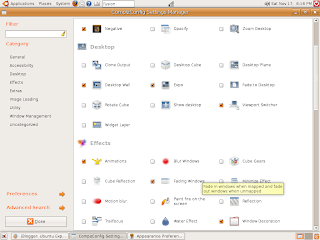 My PC is more than four years old and I had installed a latest video card of that time. My video card is "nVidia's GeForce4 MX 440 AGP 8x". This card is capable of rendering 3D graphics. The screen at the left shows the setting window of desktop effects. To access this window, click System->Preferences->Advanced Desktop Effects Settings.
I am giving below some of the effects I could create in my desktop. "cube" effect does not work in my PC. I am looking at a possible solution. I have tried many of the effects and their performances seem to be satisfying.
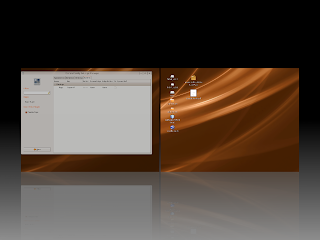
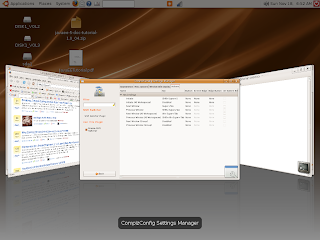
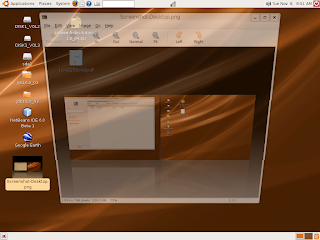
A word of caution. My PC some times freezes when these effects are enabled. So, I enable desktop effects setting only when I try exploring them. To enable this setting, click System->Preferences->Appearance. A window will appear. Select "Visual Effects" tab in that window. Select "Extra" in the selected page. This will enable the special effects. If "none" is chosen, special effects will be disabled.
Open Source is demonstrating that they are catching up with other proprietary software!
 My PC is more than four years old and I had installed a latest video card of that time. My video card is "nVidia's GeForce4 MX 440 AGP 8x". This card is capable of rendering 3D graphics. The screen at the left shows the setting window of desktop effects. To access this window, click System->Preferences->Advanced Desktop Effects Settings.
I am giving below some of the effects I could create in my desktop. "cube" effect does not work in my PC. I am looking at a possible solution. I have tried many of the effects and their performances seem to be satisfying.


A word of caution. My PC some times freezes when these effects are enabled. So, I enable desktop effects setting only when I try exploring them. To enable this setting, click System->Preferences->Appearance. A window will appear. Select "Visual Effects" tab in that window. Select "Extra" in the selected page. This will enable the special effects. If "none" is chosen, special effects will be disabled.
Open Source is demonstrating that they are catching up with other proprietary software!
Tuesday, November 6, 2007
Repositories in Ubuntu
The concept of repository and updating system files and application files automatically is welcome to an user like me. In window updates, only the system files are updated and not loaded applications. It is hard to keep a track of all applications and update them manually. Some applications have their own auto-update functions, but they are few in numbers. So, I like the concept of auto updating from repositories that keep a track of loaded application updates. Another convenience is that the updates do not require all the files of the applications to be downloaded. Only revised files are downloaded and replaced. The third convenience is the installation part. It is done automatically, without a need to refer to installation instructions of each application. Repository concept is originally from Linux and it is well integrated in Ubuntu.
Ubuntu has its own repository for system files, KDE applications and some basic applications like OpenOffice. One can add other repositories, which are unsupported by Ubuntu. There would always be warning of possible malicious software, when we add third party applications from other repositories. The user has to ascertain the genuineness of a repository before adding. I am attaching a picture showing third party software repositories that were added in my PC. I have not added all applications from these repositories. Some applications have similar functionalities. I do not want to consume memory without adding value. I add applications as and when needed.
These repositories check software updates in the background and inform the availability of updates. All we need to do is click the update (apply changes) button. Downloading of the update files and installation of them are done automatically. It is a huge task saver.
There are a lot of repositories that are not written in English. It would be difficult to add these repositories without knowing the details. One of my repositories, in fact, is in French. I use translate menu of Google Toolbar in FireFox to translate in English and read the details. This is again a big help.
I am also on the look out for new repositories that have new applications, but are not in my current repositories. Open Source has really taken off to challenge proprietary software.
Ubuntu has its own repository for system files, KDE applications and some basic applications like OpenOffice. One can add other repositories, which are unsupported by Ubuntu. There would always be warning of possible malicious software, when we add third party applications from other repositories. The user has to ascertain the genuineness of a repository before adding.
 I am attaching a picture showing third party software repositories that were added in my PC. I have not added all applications from these repositories. Some applications have similar functionalities. I do not want to consume memory without adding value. I add applications as and when needed.
These repositories check software updates in the background and inform the availability of updates. All we need to do is click the update (apply changes) button. Downloading of the update files and installation of them are done automatically. It is a huge task saver.
There are a lot of repositories that are not written in English. It would be difficult to add these repositories without knowing the details. One of my repositories, in fact, is in French. I use translate menu of Google Toolbar in FireFox to translate in English and read the details. This is again a big help.
I am also on the look out for new repositories that have new applications, but are not in my current repositories. Open Source has really taken off to challenge proprietary software.
Friday, October 26, 2007
Upgraded to Ubuntu 7.10 (Gutsy Gibbon)
I loaded Ubuntu 7.04 in my desktop a few weeks back only and started exploring it. I was lucky to see an upgrade to 7.10 last week. Immediately, I tried upgrading it. After a few tries, I could accomplish it. The upgrade download was direct and not through bit torrent. Sometimes, the download speed became slow and had to abort the download. It took nearly 8 hours to complete the download and installation, excluding my aborted attempts. 1068 files were downloaded for the upgrade. The installation was smooth.
One positive thing that happened was on Google Earth. IN Ubuntu 7.04, it was not working. When I installed Google Earth, I did not press "Quit" and instead pressed "OK" in the installation dialog window. The Ubuntu support document specifically said "not to do this". In a hurry, I did this mistake. I was logged out every time, I launched Google Earth in Ubuntu 7.04. I wanted to uninstall and was looking in the net for a neat uninstall procedure. In the mean time, I upgraded Ubuntu to 7.10. To my surprise, Google Earth started working automatically under Ubuntu 7.10.
I find a lot of applications added in 7.10 repository. I had Automatix2 repository in my earlier version of Ubuntu. This did not work after upgrade. I had to uninstall it and install the one suitable for Ubuntu 7.10. This also works now.
Ubuntu 7.10 seems to be faster than 7.04. I can not be sure of it, since it is not based on any verifiable data. Installation and usage of 7.10 was smooth so far. All my loaded applications and configurations were intact, excepting Automatix2, of course.
I connected my web cam through usb port. Ubuntu immediately recognized it as a drive and started downloading all pictures. It was only a temporary drive. I copied required pictures into my PC.
I am having some difficulties in media players. I will write about them after solving the issues on hand.
One positive thing that happened was on Google Earth. IN Ubuntu 7.04, it was not working. When I installed Google Earth, I did not press "Quit" and instead pressed "OK" in the installation dialog window. The Ubuntu support document specifically said "not to do this". In a hurry, I did this mistake. I was logged out every time, I launched Google Earth in Ubuntu 7.04. I wanted to uninstall and was looking in the net for a neat uninstall procedure. In the mean time, I upgraded Ubuntu to 7.10. To my surprise, Google Earth started working automatically under Ubuntu 7.10.
I find a lot of applications added in 7.10 repository. I had Automatix2 repository in my earlier version of Ubuntu. This did not work after upgrade. I had to uninstall it and install the one suitable for Ubuntu 7.10. This also works now.
Ubuntu 7.10 seems to be faster than 7.04. I can not be sure of it, since it is not based on any verifiable data. Installation and usage of 7.10 was smooth so far. All my loaded applications and configurations were intact, excepting Automatix2, of course.
I connected my web cam through usb port. Ubuntu immediately recognized it as a drive and started downloading all pictures. It was only a temporary drive. I copied required pictures into my PC.
I am having some difficulties in media players. I will write about them after solving the issues on hand.
Monday, October 22, 2007
A blog on my Ubuntu experiences
I have been posting my Ubuntu experiences in my other blog site, where I cover a variety of subjects. As I started posting more of my experiences with Ubuntu, I realized that creating a new blog site is proper. I am providing links below of my previous posts that have relevance to Ubuntu. Though it is only two months since I started experimenting with Ubuntu, it was quite eventful one and exciting. It was also my first experience with Linux. There are more posts to come, as I explore Ubuntu.
- Another step towards Open Source Operating System
- My first experiences with Ubuntu 7.04 (Fiesty Fawn)
- I am still writing this post through Windows OS. I encountered tag problems using Blogger site with FireFox and Ubuntu. I have to explore further to provide details. Probably, next post subject may be on it.
- This site was created using standard template available in Blogger.com. I tweaked HTML code at three places to get the present view. I am testing the waer before plunging in.
Subscribe to:
Posts (Atom)